Course Introduction
Watch this video to checkout the details and the benefits you get from this training.

Start your career in Workday Integration & Studio
This course provides in-depth training on Workday Integration and Workday Studio, covering key concepts, tools, and techniques for seamless integration within the Workday environment. Participants will learn how to create and manage custom reports, work with Core Connectors, and utilize EIB (Enterprise Interface Builder) for importing and exporting data. The course also delves into Workday Studio, teaching students to build, test, and debug integrations using various tools like RaaS (Reports-as-a-Service) and Workday Web Services. By the end of the course, learners will be proficient in integrating data and managing business processes within Workday using the powerful features of Workday Studio and its reporting tools.
By completing this course, you will be able to learn :
- Understand Workday Integration: Learn the fundamentals of integrating within Workday.
- Create Custom Reports: Master the creation and management of reports in Workday.
- Work with Core Connectors: Learn to use Core Connectors for integration tasks.
- Develop with EIB: Build and manage inbound and outbound EIBs for data exchange.
- Use Workday Studio: Gain hands-on experience with Workday Studio for integration projects.
- Test and Debug: Learn how to test and debug integrations in Workday Studio.
- Explore Advanced Concepts: Understand advanced integration topics like exception handling and scalability.
-
Leverage RaaS: Use Reports-as-a-Service (RaaS) for integrations and reporting.

Meet Your Instructor
- Certified Workday Integrations Consultant with 8+ years of experience in HR system implementation and configuration.
- Expertise in Workday Integration Solutions and specialized in Third-Party Payroll Integrations using Workday Cloud Platform.
- In-depth knowledge of Workday Studio, EIB, Core Connectors, and CCTPP (Cloud Connect for Third-Party Payroll).
- Successfully led 10+ Workday projects, focusing on integrations with global multi-national clients across various industries.
- Well-versed in Workday Core Integration, Cloud Connect for Third-Party Payroll, and Workday Studio for HCM modules.
- Proficient in developing and configuring EIB (Inbound & Outbound), Core Connector Worker, PECI, and PICOF integrations.
- Expertise in transforming data and delivering it to third parties in the desired format through Workday integrations.
- Involved in production support for Workday HCM Suite, focusing on business processes, compensation, security, and the maintenance of key data points between systems.
- Mentoring professionals aiming to develop advanced integration skills and preparing them for CCTPP certifications.
- Certified in Workday Core Integration, CCTPP, and Workday Studio.
Course Curriculum
- Assessment - 1. Introduction to Workday Financial Integrations
- Assessment - 2. Workday Financial Data Model Overview
- Assessment - 3. Integration Framework Basics
- Assessment - 4. Outbound Financial Integrations (EIB)
- Assessment - 5. Inbound Financial Integrations (EIB)
- Assessment - 6. Workday Studio Architecture
- Assessment - 7. Studio Setup & Development Environment
- Assessment - 8. Studio - Inbound Financial Integration
- Assessment - Module 9 - Studio – Outbound Financial Integration
- Assessment - Module 10 - Web Services for Financials
- Assessment - Module 11 - Error Handling & Reconciliation
- Assessment - Module 12 - Scheduling & Monitoring
- Assessment - Module 13 - Security for Financial Integrations
- Assessment - Module 14 - Testing Strategy for Financial Integrations
- Assessment - Module 15 - Real-Time Finance Use Cases
- Assessment - Module 16 - Migration & Cutover Considerations
- Assessment - Module 17 - Performance Optimization
- Assignment - 1. Introduction to Workday Financial Integrations
- Assignment - 2. Workday Financial Data Model Overview
- Assignment - Module 3 - Integration Framework Basics
- Assignment - 4. Outbound Financial Integrations (EIB)
- Assignment - 5. Inbound Financial Integrations (EIB)
- Assignment - 6. Workday Studio Architecture
- Assignment - 7. Studio Setup & Development Environment
- Assignment - 8. Studio - Inbound Financial Integration
- Assignment - 9. Studio - Outbound Financial Integration
- Assignment - 10. Web Services for Financials
- Assignment - 11. Error Handling & Reconciliation
- Assignment - 12. Scheduling & Monitoring
- Assignment - 13. Security for Financial Integrations
- Assignment - 14. Testing Strategy for Financial Integrations
- Assignment - 15. Real-Time Finance Use Cases
- Assignment - 16. Migration & Cutover Considerations
- Assignment - 17. Performance Optimization
- Lab Activity - 1. Create an Integration System
- Lab Activity - 2. Launch the Integration System
- Lab Activity - 3. Configure the Transaction Log Service and Launch
- Lab Activity - 4. Create an Integration Business Process
- Lab Activity - 5. Create a Reorganization
- Lab Activity - 6. Create a Company
- Lab Activity - 7. Add Company Contact Information
- Lab Activity - 8. Add Company Tax ID Number
- Lab Activity - 9. Create Ledger
- Lab Activity - 10. Create Ledger Year and Ledger Periods
- Lab Activity - 11. Update Ledger Period Status
- Lab Activity - 12. Create a Cost Center
- Lab Activity - 13. Assign Cost Center to a Cost Center Hierarchy
- Lab Activity - 14. Create a Cost Center Hierarchy
- Lab Activity - 15. Maintain Worktag Usage
- Lab Activity - 16. Maintain Spend Category
- Lab Activity - 17. Create Spend Category Hierarchy
- Lab Activity - 18. Create Revenue Category
- Lab Activity - 19. Create and Launch Inbound Organization Integration System
- Lab Activity - 20. Create an Outbound New Hire EIB
- Lab Activity - 21. Create EIB and generate Template to Add Organizations
- Lab Activity - 22. Create EIB and generate Template to Manage Employee Languages
- Lab Activity - 23. Set Up Outbound EIB
- Lab Activity - 24. Create Web Service Data Source
- Lab Activity - 25. Create Security Proxy to Grant Report Access
- Lab Activity - 26. Set Up Launch Parameters for Web Service Data Source
- Lab Activity - 27. Create HTTPS Transport Protocol
- Lab Activity - 28. Create Integration Transformation
- Lab Activity - 29. Manage Outbound EIBs with Custom XSLTs
- Lab Activity - 30. Set Up Custom Report Transformation
- Lab Activity - 31. Set Up Dynamic Filename Definition
- Lab Activity - 32. Set Up EIBs Using Templates from Web Service Operations
- Lab Activity - 33. Set Up Inbound EIB
- Lab Activity - 34. Customize EIB Spreadsheet Template
- Lab Activity - 35. Generate EIB Spreadsheet Template
- Lab Activity - 36. Set Up EIB Spreadsheet
- Lab Activity - 37. Set Up Business Process Security for EIB Upload
- Lab Activity - 38. Launch EIB Spreadsheet Upload
- Lab Activity - 39. Run the Hello Cloud Sample Assembly
- Lab Activity - 40. Run the Hello Workday Web Services Sample Assembly
- Lab Activity - 41. Run the Common Usage Patterns Sample Assembly
- Lab Activity - 42. Run the Debugging Sample Assembly
- Lab Activity - 43. Run the Workday-In Features Sample Assembly
- Lab Activity - 44. Run the AUnit Sample Tests
- Lab Activity - 45. Download and Install Workday Studio for Windows
- Lab Activity - 46. Download and Install Workday Studio for macOS
- Lab Activity - 47. Remove Workday Ivy Natures from Studio Projects
- Lab Activity - 51. Assign an Integration System User Account to an Integration
- Lab Activity - 52. Deploy Integrations to Workday
- Lab Activity - 48. View Deployed Integrations in Workday
- Lab Activity - 53. View Deployed Integrations in Workday
- Lab Activity - 49. Configure Studio to Use a HTTPS Proxy Server
- Lab Activity - 54. Launch Integrations from Studio
- Lab Activity - 50. Run the Workday-In Features Sample Assembly
- Lab Activity - 55. Edit Launch Configurations
- Lab Activity - 56. Load Consolidated Reports for Integrations
- Lab Activity - 57. Run the Hello Workday Web Services Sample Assembly
- Lab Activity - 58. Run the Common Usage Patterns Sample Assembly
- Lab Activity - 59. Run the Hello Cloud Sample Assembly
- Lab Activity - 60. Run the PrismAnalytics Sample Assembly
- Lab Activity - 61. Set Up Document Transformation Connector
- Lab Activity - 62. Test Web Services Using a WSDL File
- Lab Activity - 63. Test Web Services Using an XSD File
- Lab Activity - 64. Test Individual Web Services from the Schema Explorer
- Lab Activity - 65. Test Get Operations and Request Messages Using the Request Builder Wizard
- Lab Activity - 66. Configure Web Service Tester Authentication
- Lab Activity - 67. Configure Web Service Tester X.509 Authentication
- Lab Activity - 68. Configure Web Service Tester Advanced WS-Security
- Lab Activity - 69. Edit Launch Configurations
- Lab Activity - 70. Load Consolidated Reports for Integrations
- Lab Activity - 71. Save Consolidated Reports to Your Workspace
- Lab Activity - 72. View Workday Integration Event Details Using Consolidated Reports
- Lab Activity - 73. Delete Integrations and EIBs
- Lab Activity - 74. Schedule Integration for Last Day of Each Calendar Quarter
- Lab Activity - 75. Create Integration Notifications
- Lab Activity - 76. Launch an Integration
- Lab Activity - 77. Audit Integration Events
- Lab Activity - 78. Monitor Integrations with the Consolidated Report Viewer Events Log
- Lab Activity - 79. Monitor Integrations with the Consolidated Report Viewer Profile Log
- Lab Activity - 80. Replay Assembly Executions for Consolidated Reports
- Lab Activity - 81. Download and Install Workday Studio for Windows
- Lab Activity - 82. Assign an Integration System User Account to an Integration
- Lab Activity - 83. Display WSDL and XSD Files
- Lab Activity - 84. Display Workday Web Service WSDLs
- Lab Activity - 85. Create Cash Basis Accounting
- Lab Activity - 86. Correct Consolidation Data
- Lab Activity - 87. Create an AUnit Test Skeleton for an Assembly Project
- Lab Activity - 88. Test Web Services Using a WSDL File
- Lab Activity - 89. Download and Install Workday Studio for Windows
- Lab Activity - 90. Display WSDL and XSD Files
- Lab Activity - 91. Display Workday Web Service WSDLs
- Lab Activity - 92. Display Custom RaaS Report Schemas
- Lab Activity - 93. Set Up Core Connector - Background Check Order Integrations
- Lab Activity - 94. Set Up Consolidation Data Capture
- Lab Activity - 95. Create Source Systems
- Lab Activity - 96. Create Consolidation Data Mapping Table Definitions
- Lab Activity - 97. Create Consolidation Data Mapping Tables
- Lab Activity - 98. Configure Suspense Account Rules
- Lab Activity - 99. Create Consolidation Data Capture Integration
- Lab Activity - 100. Map Source Systems to Integration Systems
- Lab Activity - 101. Create Cash Basis Accounting
- Lab Activity - 102. Set Up Data Initialization Service (DIS) Integration
- Lab Activity - 103. Create Integration System
- Lab Activity - 104. Set Up Integration Data Initialization Service
- Session - Demo (53:55)
- Session Video - Introduction to Workday Integrations and Types (69:14)
- Session Video - Business Objects and Data Source Concepts (58:48)
- Session Video - Creating and Understanding Custom Reports (53:46)
- Session Video - Report Types and Advanced Reporting Overview (65:56)
- Session Video - Calculated Fields and Custom Report Linking (70:47)
- Session Video - Building and Managing Calculated Fields (50:10)
- Session Video - Report Security, Scheduling, and Prompts (79:21)
- Session Video - Contextual Reporting and Business Process Reports (68:06)
- Session Video - Core Connector Overview and Integration Architecture (71:05)
- Session Video - Configuration of Core Connector Worker Integration (95:05)
- Session Video - Field Attributes and Document Retention in Core Connector (68:26)
- Session Video - Integration Templates and Field Attribute Behavior (76:07)
- Session Video - Troubleshooting Core Connector and Connector Templates (66:54)
- Session Video - Document Transformation Using XSLT and Oxygen Editor (67:13)
- Session Video - ETV and XTT Concepts in Outbound EIB Processing (77:26)
- Session Video - Building and Launching Outbound EIB With SFTP Setup (56:16)
- Session Video - Creating Inbound EIB and Loading Data via Template (69:25)
- Session - Studio Introduction and Terminologies Overview (59:59)
- Session Video - Integration Security, Events, and Studio Deployment (69:41)
- Session Video - Assembly Structure and Component Wiring in Studio (69:10)
- Session Video - Assembly Parameters and Launch Configuration (44:13)
- Session Video - Studio Deployment and Launch Parameter Settings (32:38)
- Session Video - Validating Input With Studio Parameters (51:26)
- Session Video - Studio Common Components and Parameter Validation (53:51)
- Session Video - Calling RAAS and Using Splitter Aggregator (63:47)
- Session Video - Invoking WWS and Launching From Studio (47:58)
- Session Video - Workday-In Configuration and Usage (57:03)
- Session Video - Payroll Interface Integration Use Case (66:36)
- Session Video - Processing Payroll Data in Studio Integration (39:12)
- Assessment - 1. Introduction to Workday Integrations and Workday Reporting
- Assessment - 2. Terminology and Concepts, Creating Custom Reports
- Assessment - 3. Create Custom Report, Edit Custom Report
- Assessment - 4. Edit Report, Advanced Report
- Assessment - 5. Advanced Reporting, Calculate Fields
- Assessment - 6. Calculated Fields, Contextual Reporting
- Assessment - 7. Report Security, Locating Reports, Scheduling Reports
- Assessment - 8. Report Management & Other Configuration Features, Matrix Reporting Details
- Assessment - 9. Core Connector
- Assessment - 10. Document Transformation, XSLT, Oxygen
- Assessment - 11. XSLT - ETVXTT EIB
- Assessment - 12. Outbound EIB
- Assessment - 13. Inbound EIB
- Assessment - 14. Workday Studio Overview
- Assessment - 15. Workday Studio - Assembly and Components
- Assessment - 16. Workday Studio - Scalability
- Assessment - 17. Workday Studio - Common Components
- Assessment - 18. Calling RAAS and Using Splitter & Aggregator In Studio
- Assessment - 19. Calling WWS and Launching Integrations from Studio
- Assessment - 20. Workday - In Features
- Assessment - 21. Payroll Interface Studio
- Assignment - 1. Introduction to Workday Integrations and Workday Reporting
- Assignment - 2. Terminology and Concepts, Creating Custom Reports
- Assignment - 3. Create Custom Report, Edit Custom Report
- Assignment - 4. Edit Report, Advanced Report
- Assignment - 5. Advanced Reporting, Calculate Fields
- Assignment - 6. Calculated Fields, Contextual Reporting
- Assignment - 7. Report Security, Locating Reports, Scheduling Reports
- Assignment - 8. Report Management & Other Configuration Features, Matrix Reporting Details
- Assignment - 9. Core Connector
- Assignment - 10. Document Transformation, XSLT, Oxygen
- Assignment - 11. XSLT - ETVXTT EIB
- Assignment - 12. Outbound EIB
- Assignment - 13. Inbound EIB
- Assignment - 14. Workday Studio Overview
- Assignment - 15. Workday Studio - Assembly and Components
- Assignment - 16. Workday Studio - Scalability
- Assignment - 17. Workday Studio - Common Components
- Assignment - 18. Calling RAAS and Using Splitter & Aggregator In Studio
- Assignment - 19. Calling WWS and Launching Integrations from Studio
- Assignment - 20. Workday - In Features
- Assignment - 21. Payroll Interface Studio
- Lab Activity - 1. Create Custom Report (Type=Simple)
- Lab Activity - 2. Change the Data Source on the Report
- Lab Activity - 3. Change to Advanced Report Type and Configure Filter that Prompt User
- Lab Activity - 4. Demo - Contextual Reporting
- Lab Activity - 5. Optional - Add Custom Reports to Menus and as Related Actions
- Lab Activity - 6. Add Report Tags to Custom Reports
- Lab Activity - 7. Track Custom Reports
- Lab Activity - 8. Scheduling Reports
- Lab Activity - 9. Create Matrix Report
- Lab Activity - 10. Create an Integration System
- Lab Activity - 11. Launch the Integration System
- Lab Activity - 12. Configure the Transaction Log Service and Launch
- Lab Activity - 13. Create an Integration Business Process
- Lab Activity - 14. Create and Launch Inbound Organization Integration System
- Lab Activity - 15. Fixed Length Transformation
- Lab Activity - 16. Delimited File Transformation
- Lab Activity - 17. XML Transformation Part 1
- Lab Activity - 18. XML Transformation Part 2
- Lab Activity - 19. Chaining ETV and XTT
- Lab Activity - 20. Create an Outbound New Hire EIB
- Lab Activity - 21. Schedule the New Hire Employee Integration System
- Lab Activity - 22. Launch an EIB Integration through a Business Process
- Lab Activity - 23. Using Custom Report Transformation
- Lab Activity - 24. Review a New Hire Custom Report
- Lab Activity - 25. Create EIB for Hire Employee
- Lab Activity - 26. Review the Template Model
- Lab Activity - 27. Launch Integration System
- Lab Activity - 28. Edit Integration Attachment
- Lab Activity - 29. Maintain Reference IDs
- Lab Activity - 30. Create EIB and generate Template to Add Organizations
- Lab Activity - 31. Create EIB and generate Template to Manage Employee Languages
- Lab Activity - 32. Populating Spreadsheets to Add Organizations
- Lab Activity - 33. Populating Spreadsheets with Child Data to Manage Languages
- Lab Activity - 34. Customize Template Model
- Lab Activity - 35. Populating Customized Spreadsheets
- Lab Activity - 36. Generating Spreadsheet Template with Data
- Lab Activity - 37. Troubleshooting Errors and Hiring Employees
- Lab Activity - 38. Workday - In Features
- Lab Activity - 39. Payroll Interface Studio
- Lab Activity - 1. Manage Workday Studio Work Space
- Lab Activity - 2. Modify HelloCloud Component
- Lab Activity - 3. MYHELLOCLOUD Assembly
- Lab Activity - 4. Web Service Tester
- Lab Activity - 5. MYHELLOWWS Assembly
- Lab Activity - 6. Create Web Service Enabled Report
- Lab Activity - 7. MYHELLORAAS Assembly
- Lab Activity - 8. MYHELLORAAS - Store
- Lab Activity - 9. MYHELLORAAS - Deliver
- Lab Activity - 10. MYHELLORAAS and XSLT
- Lab Activity - 11. Using MYHELLORAAS to Create a Delimited File
- Lab Activity - 12. Using the Workday Studio
- Capstone Project - 1. Bi-Directional Benefits InboundOutbound Provider Integration (Studio & CCW)
- Capstone Project - 2. End-to-End Global Payroll Outbound Integration Using Workday Studio
- Capstone Project - 3. Enterprise Core Connector for Worker (CCW) & Custom Studio Outbound Suite
- Capstone Project - 4. Automated Financial Journals Inbound Interface with Document Transformation (DT)
- Capstone Project - 5. Real-Time Worker Inbound Provisioning with REST API & Workday Studio

Got Questions?
Frequently Asked Questions
When does the course start and finish?
The course is entirely self-paced. You decide when you start and when you finish.
How long do I have access to the course?
That depends on the type of Subscription you bought - Monthly or Yearly. After enrolling, you have unlimited access to this course and materials within across any and all devices you own.
What do I get after I signup?
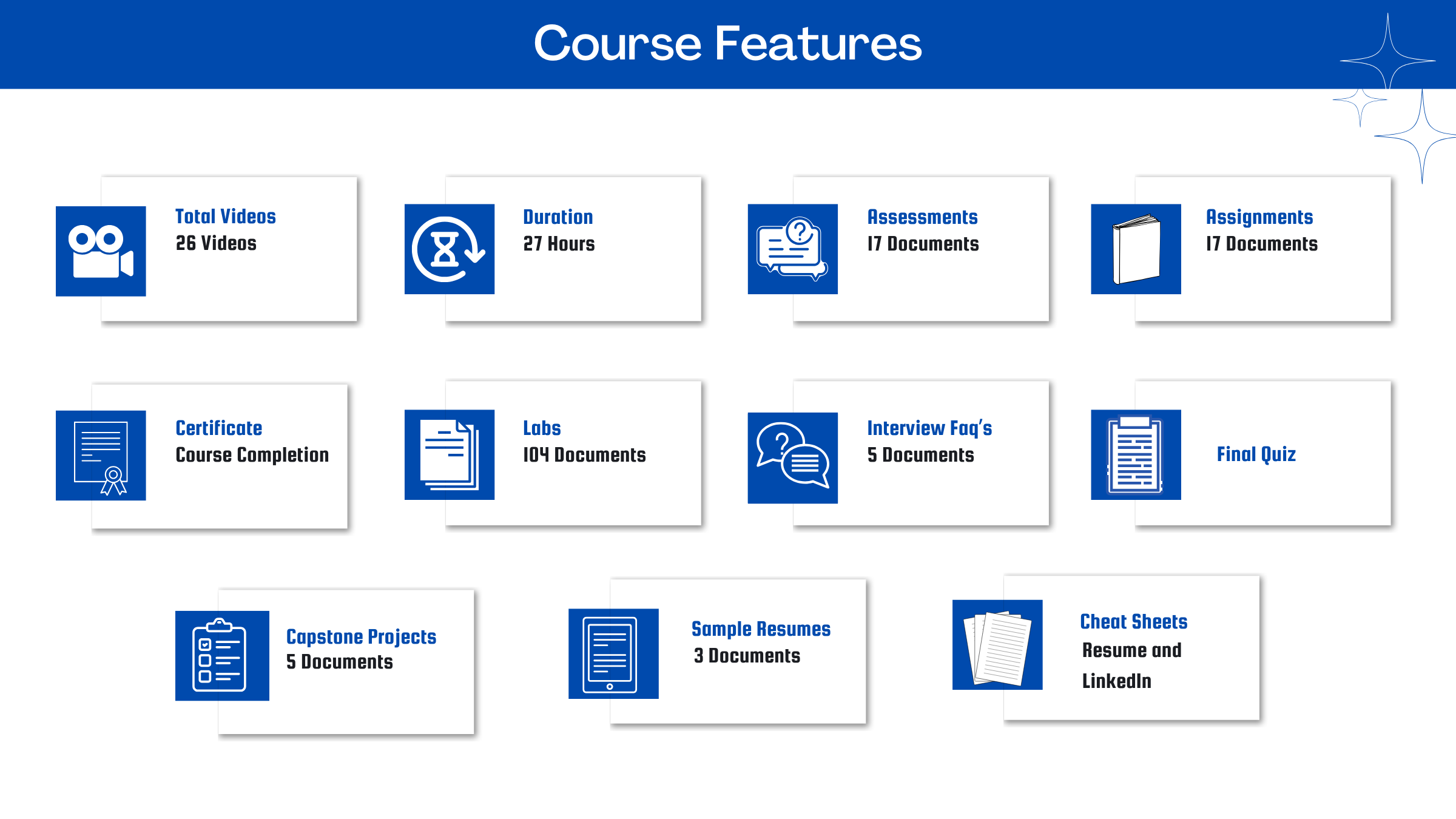
After you signup and make the payment, you will have full access to the course which includes,
1. Session Videos (these videos are from actual live sessions from the past)
2. Assignments
3. Assessments
4. Lab documents
5. Other pdfs (configuration documents, eBooks, pdfs, interview and certification FAQs)
How do I get access to practice on the Tenant?
Reach out to your Support team and send an email to support@zarantech.com and they will send you the details and the monthly cost for the Tenant (if available)
Are the videos or materials downloadable?
No, they are not. But you have unlimited access to view them from any device and on this platform depending on your Subscription type. Everything on this platform is the intellectual property of ZaranTech
How soon after I enroll and make payment would get access to the course?
Immediately
What if I have doubts, whom do I ask?
These are pre-recorded videos from the actual Live Training program. Most of the doubts were cleared in the session videos itself. But if you still have any questions, please raise a ticket, and our support team will help you https://zarantech.zohodesk.in/portal/en/newticket
What if I have an issue accessing the course?
You can Raise a ticket by clicking the link below and selecting the appropriate ticket - https://zarantech.zohodesk.in/portal/en/newticket
How will I get my course completion certificate?
Once you have completed the training and the Final Quiz/Assessment, you can avail of your Certificate of Completion from ZaranTech which you can then showcase on LinkedIn and other Social Media portals
Do you provide Instructor-led Live training for Individuals?
Yes, we do. Email us at info@zarantech.com and we will send you all the details
How we deliver Live training - https://bit.ly/How-we-deliver-training
Do you provide Corporate/group training?
Yes, we do. We have trained more than 100 Workday customers with over 4000 participants in the USA, Canada, Europe, Asia, and South America. We offer corporate training for all Workday modules.
Course Catalog - https://bit.ly/workday-course-catalog
How we deliver corporate training (video) - https://bit.ly/workday-Corp-training
How do I get certified in Workday?
Workday certification is worth its weight in gold as it gives a holistic understanding of the entire application to a new professional. The criterion to attend the Workday Certification Program is that one must either be a part of Workday or should be associated with one of its partners. The certification program should be completed within a month but if you fail to get the certification in your first attempt then Workday allows you to re-do your training. This Enterprise application undergoes numerous minor updates and 2-3 major updates in a year. Whenever a major update takes place the user has to go through the training again and get the certification. This is done by Workday so that all the users remain on the same page. If you are not an employee of Workday or any of its partner companies, it is impossible to gain a Workday certification.
What if I am unhappy with the course?
We would never want you to be unhappy! If you are unsatisfied with your purchase, contact us in the first 7 days and we will give you a full refund.
What is your Refund Policy and Terms of Use?
To know more about canceling the enrollment, refund, and rescheduling policy, visit:
Refund and Rescheduling Policy – https://www.zarantech.com/Refund-policy/
Terms of Service – https://www.zarantech.com/terms-of-use/
What other Resources do you provide?
YouTube - https://www.youtube.com/@workdaylearner community
LinkedIn - https://www.linkedin.com/showcase/workday-learner-community/
Quora - https://workdaylearnercommunity.quora.com/
Workday Corporate Course Catalog - https://bit.ly/workday-course-catalog
Name some official partners of Workday.
Implementation Partners List -https://www.workday.com/en-us/partners-services/partners/services-partners.html#?q=
Integration Partners List - https://www.workday.com/en-us/partners-services/partners/software-partners.html#?q=
Past Students Testimonials.