Course Introduction
Watch this video to checkout the details and the benefits you get from this training.
Start Your Career in SAP Success Factors Time Off
This course teaches how to configure and manage employee leave, attendance, and time tracking in SAP SuccessFactors Time Management. You will learn how to set up time off requests, work schedules, accrual rules, time sheets, overtime, leave of absence, clock in and clock out, and payroll integration. The course also covers reporting, data imports, and time management configurations to help organizations manage employee time effectively. It is designed for beginners as well as professionals who want to work with SAP SuccessFactors Time Management.
By completing this course, you will be able to learn:
- Understand the fundamentals of SAP SuccessFactors Time Off and Time Management
- Configure time off requests, work schedules, holidays, and time profiles
- Set up accrual rules, time accounts, and leave management processes
- Manage time sheets, attendance, overtime, and time valuation configurations
- Configure flextime, leave of absence, and clock in and clock out features
- Import time management data and generate time off reports
-
Integrate SAP SuccessFactors Time Management with payroll and employee data processes
Course Curriculum
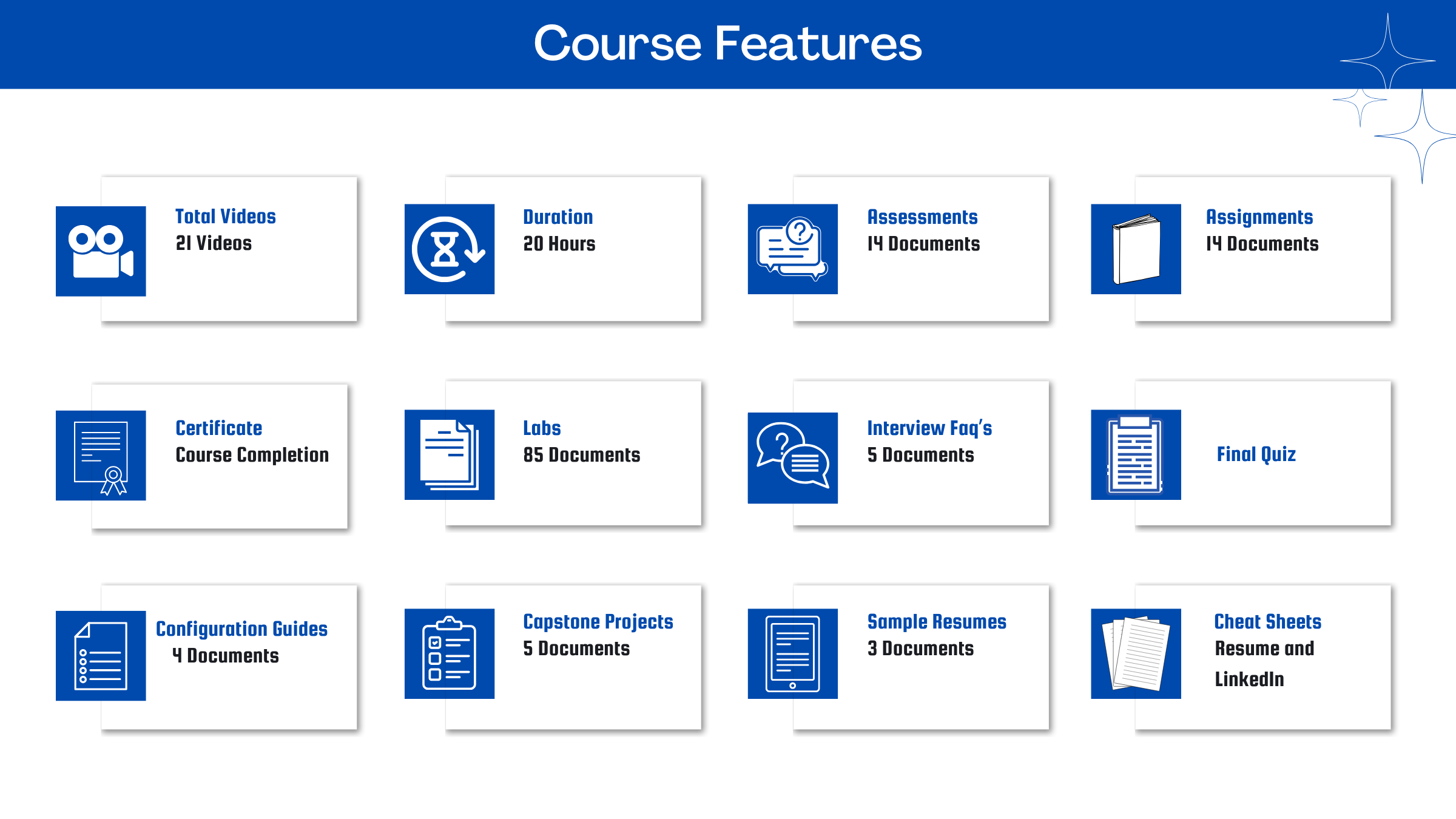
- Assessment - 1. Introducing SAP SuccessFactors Employee Central Time Off
- Assessment - 2. Requesting Absences in Time Off
- Assessment - 3. Configuring Basic Accrual Rules in Time Off
- Assessment - 4. Configuring Event-Related Accrual Rules in Time Off
- Assessment - 5. Managing Time Sheets
- Assessment - 6. Setting up and Configuring Time Sheet
- Assessment - 7. Configuring Time Valuation and Compensation
- Assessment - 8. Configuring Flextime
- Assessment - 9. Handling Leave of Absences (LOA) and Time Off Reporting
- Assessment - 10. Handling Time Off Imports
- Assessment - 11. Importing Time Off Structures
- Assessment - 12. Setting Up Clock In Clock Out in SAP SuccessFactors Time Tracking
- Assessment - 13. Integrating Time Management with Payroll
- Assessment - 14. Succeeding as a Consultant
- Assignment - 1. Introducing SAP SuccessFactors Employee Central Time Off
- Assignment - 2. Requesting Absences in Time Off
- Assignment - 3. Configuring Basic Accrual Rules in Time Off
- Assignment - 4. Configuring Event-Related Accrual Rules in Time Off
- Assignment - 5. Managing Time Sheets
- Assignment - 6. Setting up and Configuring Time Sheet
- Assignment - 7. Configuring Time Valuation and Compensation
- Assignment - 8. Configuring Flextime
- Assignment - 9. Handling Leave of Absences (LOA) and Time Off Reporting
- Assignment - 10. Handling Time Off Imports
- Assignment - 11. Importing Time Off Structures
- Assignment - 12. Setting Up Clock In Clock Out in SAP SuccessFactors Time Tracking
- Assignment - 13. Integrating Time Management with Payroll
- Assignment - 14. Succeeding as a Consultant
- Lab Activity - 1. Overview of the Job Steps for a Time Administrator
- Lab Activity - 2. Holiday Work Pattern
- Lab Activity - 3. Create Holidays
- Lab Activity - 4. Create Holiday Calendars
- Lab Activity - 5. Create a Custom Holiday Calendar
- Lab Activity - 6. Create a Work Schedule
- Lab Activity - 7. Create an Individual Work Schedule (IWS)
- Lab Activity - 8. Create a Temporary Work Schedule
- Lab Activity - 9. Create a Period Work Schedule
- Lab Activity - 10. Create a Time Type
- Lab Activity - 11. Configuration of ManagerTime Administrator Workflow for Time Off
- Lab Activity - 12. Create a Time Profile
- Lab Activity - 13. Set Up a Time Type and Time Profile
- Lab Activity - 14. Update Time Off Information in Employee Information
- Lab Activity - 15. Create Take Rules
- Lab Activity - 16. Create a Workflow
- Lab Activity - 17. Configure Accruals
- Lab Activity - 18. Configure Time Account Types
- Lab Activity - 19. Add the Time Account Type to the Time Type
- Lab Activity - 20. Create Time Accounts and Assign Time Profiles
- Lab Activity - 21. Create an Annual Accrual Rule
- Lab Activity - 22. Assign Accrual Rules to the Time Account Type
- Lab Activity - 23. Generate the Time Account
- Lab Activity - 24. Configure a Fixed Amount Accrual Rule
- Lab Activity - 25. Customize the Accrual Lookup by Seniority Object
- Lab Activity - 26. Configure the Accrual Lookup by Seniority Table
- Lab Activity - 27. Configure an Accrual Rule with Seniority and Caps
- Lab Activity - 28. Create Hire and Termination Rules
- Lab Activity - 29. Configure Period-End Processing
- Lab Activity - 30. Execute Period-End Processing
- Lab Activity - 31. Create a Period-End Processing Rule
- Lab Activity - 32. Configure Interim Time Account Updates
- Lab Activity - 33. Run the Interim Time Account Update
- Lab Activity - 34. Configure Monthly Accruals
- Lab Activity - 35. Set Up Monthly Accruals
- Lab Activity - 36. Role Based Permission Settings for Time Sheets
- Lab Activity - 37. RBP Settings for the Time Sheet Fields Within Job Info
- Lab Activity - 38. RBP Settings for Administrative Access to Time Tracking Objects
- Lab Activity - 39. Configuration of Time Recording Admissibility Rules
- Lab Activity - 40. Dynamic Break Configuration
- Lab Activity - 41. Enable and Configure Time Sheets
- Lab Activity - 42. Define Attendance, Break, and On Call Time Types
- Lab Activity - 43. Define Time Sheet Settings
- Lab Activity - 44. Valuation Method
- Lab Activity - 45. Creation of Time Valuation of Type Filter Input Groups
- Lab Activity - 46. Creation of Time Valuation of Type Filter Segments from Input Groups
- Lab Activity - 47. Creation of Time Valuations of Valuation Type Deduct Group from Input Groups
- Lab Activity - 48. Creation of the Time Valuation of Difference Between Threshold and Input
- Lab Activity - 49. Time Valuation Error Messages
- Lab Activity - 50. Create Time Valuation Alerts
- Lab Activity - 51. Set Up Time Collectors by Using Time Type Groups
- Lab Activity - 52. Time Collectors in Time Valuation Example
- Lab Activity - 53. Overtime Compensation with Time off in Lieu
- Lab Activity - 54. Configure Working Time Accounts
- Lab Activity - 55. Create New Work Schedule and Time Type Groups
- Lab Activity - 56. Create a Time Valuation Scenario 1,2,3
- Lab Activity - 57. Add Time Valuations to a Time Recording Profile
- Lab Activity - 58. Assign Time Pieces to Employee
- Lab Activity - 59. Set Up Night Shift Bandwidth in a Work Schedule
- Lab Activity - 60. Flextime Bandwidth
- Lab Activity - 61. Define Flextime Bandwidth in a Work Schedule
- Lab Activity - 62. Create a Time Type Group for Flextime Bandwidth
- Lab Activity - 63. Set Up Time Valuations for Flextime Bandwidth
- Lab Activity - 64. Define Extra Time Types
- Lab Activity - 65. Create Extra Time Type Groups
- Lab Activity - 66. Set Up Time Valuations for Flextime Violation
- Lab Activity - 67. Configure Leave of Absence
- Lab Activity - 68. Request Leave of Absence (LOA)
- Lab Activity - 69. Return the Employee to Work
- Lab Activity - 70. Propagate Employee Job Information
- Lab Activity - 71. Import Work Schedule
- Lab Activity - 72. Import Leave Requests
- Lab Activity - 73. Import Time Off Account Balance
- Lab Activity - 74. Import of the Time Off Profile
- Lab Activity - 75. Import the Time Profile
- Lab Activity - 76. Import the Time Types Assigned to the Time Profile
- Lab Activity - 77. Import the Holiday Calendar
- Lab Activity - 78. Create Time Event Types
- Lab Activity - 79. Create Clock In Clock Out Groups
- Lab Activity - 80. Edit Clock In Clock Out Settings
- Lab Activity - 81. Configure Time Type Derivation
- Lab Activity - 82. Enable Clock In Clock Out Group Field in Job Information
- Lab Activity - 83. Set Up Grace Period Rounding
- Lab Activity - 84. Create Clock In Clock Out Employee Full Synchronization Details Object
- Lab Activity - 85. Integration of External Time Tracking Services with Clock In Clock Out
- Capstone Project - 1. Employee Self-Service Time Off Experience
- Capstone Project - 2. Global Time Off Policy Design
- Capstone Project - 3. Leave of Absence and Payroll Integration
- Capstone Project - 4. Multi-Country Time Off Harmonization
- Capstone Project - 5. Time Off Compliance and Audit Control Framework

Meet Your Instructor
Experience and Expertise: Over 15 years of experience in SAP HCM and SAP SuccessFactors, with expertise in Employee Central, Time Off, Payroll, HR process automation, and employee lifecycle management.
Global Training Experience: Delivered corporate training, instructor-led workshops, and hands-on sessions on SAP SuccessFactors Employee Central, Time Off, Payroll, Recruiting, and HR best practices for global organizations.
Corporate Clientele: Trained professionals from leading organizations including Walmart, Tech Mahindra, Capgemini, PwC, SAP Malaysia, NTPC, John Deere, and other global enterprises.
Certifications: SAP HR and SAP SuccessFactors Certified Consultant with expertise in Employee Central, Time Off, Recruiting, Onboarding, and Payroll.
Diverse Technical Skills: Proficient in SAP HCM, SAP SuccessFactors Employee Central, Time Off, Payroll, Recruiting, Performance Management, workflows, integrations, data migration, and role-based permissions.
Training Methodology: Uses a hands-on, scenario-based approach with real-world HR use cases, configuration exercises, and practical labs to build implementation and support skills.
Project Leadership: Led SAP HCM and SuccessFactors implementation, configuration, migration, and end-user training projects, helping organizations streamline HR operations and employee time management.
SAP Server Access Request
Reach out to us at support@zarantech.com if you need SAP server access after the course purchase
Got Questions?
Frequently Asked Questions
When does the course start and finish?
The course is entirely self-paced. You decide when you start and when you finish.
How long do I have access to the course?
That depends on the type of Subscription you bought - Monthly or Yearly. After enrolling, you have unlimited access to this course and materials across any devices you own.
What do I get after I signup?
After you signup and make the payment, you will have full access to the course which includes,
1. Session Videos (these videos are from actual live sessions from the past)
2. Assignments
3. Assessments
4. Lab documents
5. Other pdfs (configuration documents, eBooks, pdfs, interview and certification FAQs)
How do I get access to practice on the Server?
Reach out to your Support team and send an email to support@zarantech.com and they will send you the details and the monthly cost for the Server (if available)
Are the videos or materials downloadable?
No, they are not. But you have unlimited access to view them from any device and on this platform depending on your Subscription type. Everything on this platform is the intellectual property of ZaranTech
How soon after I enroll and make payment would get access to the course?Immediately
What if I have doubts, whom do I ask?
These are pre-recorded videos from the actual Live Training program. Most of the doubts were cleared in the session videos itself. But if you still have any questions, please raise a ticket, and our support team will help you https://zarantech.freshdesk.com/support/tickets/new
What if I have an issue accessing the course?
You can Raise a ticket by clicking the link below and selecting the appropriate ticket - https://zarantech.freshdesk.com/support/tickets/new
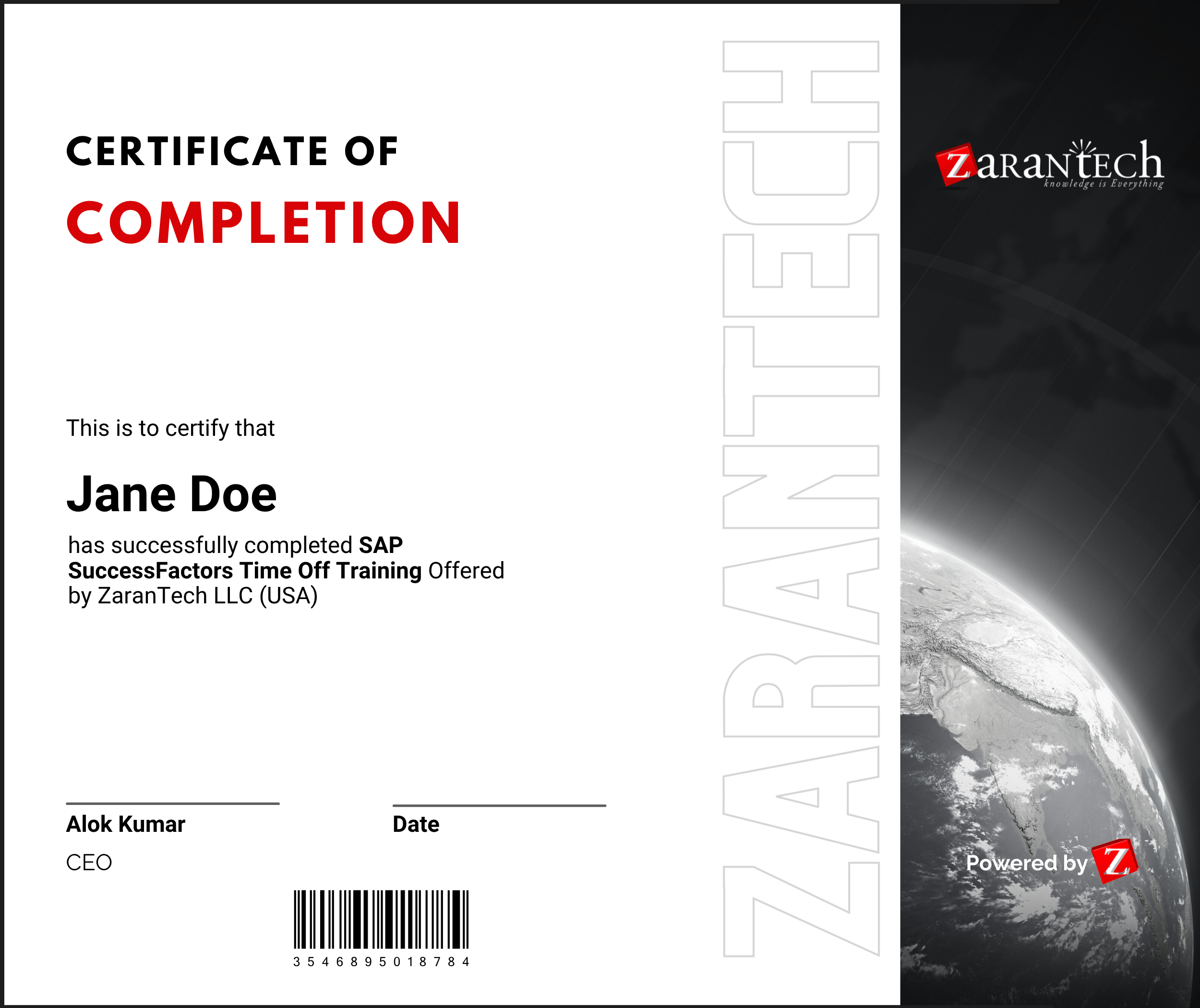
How will I get my course completion certificate?
Once you have successfully completed the training and the Final Quiz/Assessment, you can avail of your
Certificate of Completion from ZaranTech which you can then showcase on LinkedIn and other Social Media portals
Do you provide Instructor-led Live training for Individuals?
Yes, we do. Email us at info@zarantech.com and we will send you all the details
How we deliver Live training (video) - https://bit.ly/How-we-deliver-training
Do you provide Corporate/group training?
Yes, we do. We have trained more than 200 SAP customers with over 4000 participants in the USA, Canada, Europe, Asia, and South America. We offer corporate training for all SAP modules.
Course Catalog - https://bit.ly/SAP-course-catalog
How we Deliver Corporate Training (video) - https://bit.ly/sap-corp-training
How do I get certified in SAP?
SAP certification (https://training.sap.com/certification/) validates that you possess fundamental knowledge and verified skills.
List of Valid and soon to Expire SAP certifications - https://training.sap.com/certification/validity
What if I am unhappy with the course?
We would never want you to be unhappy! If you are unsatisfied with your purchase, contact us in the first 7 days and we will give you a full refund.
What is your Refund Policy and Terms of Use?
To know more about canceling the enrollment, refund, and rescheduling policy, visit:
Refund and Rescheduling Policy – https://www.zarantech.com/Refund-policy/
Terms of Service – https://www.zarantech.com/terms-of-use/
What other Resources do you provide?
YouTube (Free Videos) - https://www.youtube.com/@zarantechdotcom
LinkedIn (Free materials) - https://www.linkedin.com/showcase/sap-learner-community/
Quora (Ask any Questions) - https://saplearnercommunity.quora.com/
SAP Corporate Course Catalog - https://bit.ly/SAP-course-catalog
What other official Resources from SAP?
Official SAP Training -https://training.sap.com/
Official SAP Certification Programs - https://training.sap.com/certification/