Course Introduction
Watch this video to check out the details and the benefits you get from this training.
Start Your Career in Workday Grants Management
This course teaches how to manage grants, awards, sponsors, funds, and financial processes in Workday Grants Management. You will learn how to configure grant structures, manage the award lifecycle, process revenue recognition and closeout activities, and create reports. The course also covers Workday security, business processes, and financial setup to help you manage grant-funded projects efficiently. It is designed for beginners with no prior Workday Grants Management experience.
By completing this course, you will be able to learn:
- Understand Workday Grants Management concepts, navigation, and security fundamentals
- Configure organizations, worktags, financial accounting, and account posting rules
- Set up and manage grants, grant hierarchies, sponsors, and funds
- Manage the complete award lifecycle from creation to closeout
- Configure Facilities & Administration (F&A) costs and award revenue recognition
- Process grant-related business workflows and financial transactions in Workday
-
Create reports and dashboards to monitor grants and financial performance
Course Curriculum
- Assessment - 1. Workday Basic Introduction
- Assessment - 2. Organizations and Work Tags
- Assessment - 3. Financial Accounting Setup
- Assessment - 4. Account Posting Rules
- Assessment - 5. Security and Business Process Overview
- Assessment - 6. Grant Management
- Assessment - 7. Grant Management Configuration
- Assessment - 8. Award Life Cycle Tasks
- Assessment - 9. Award
- Assessment - 10. Sponsor
- Assessment - 11. Funds
- Assessment - 12. F&A Facilities and Administration Award Cost
- Assessment - 13. Award Revenue Recognition
- Assessment - 14. Award Close Out
- Assessment - 15. Workday Reporting
- Assignment - 1. Workday Basic Introduction
- Assignment - 2. Organizations and Work Tags
- Assignment - 3. Financial Accounting Setup
- Assignment - 4. Account Posting Rules
- Assignment - 5. Security and Business Process Overview
- Assignment - 6. Grant Management
- Assignment - 7. Grant Management Configuration
- Assignment - 8. Award Life Cycle Tasks
- Assignment - 9. Award
- Assignment - 10. Sponsor
- Assignment - 11. Funds
- Assignment - 12. F&A Facilities and Administration Award Cost
- Assignment - 13. Award Revenue Recognition
- Assignment - 14. Award Close Out
- Assignment - 15. Workday Reporting
- Lab Activity - 1. Introduction
- Lab Activity - 2. Grant Configuration
- Lab Activity - 3. Award Setup
- Lab Activity - 4. Grant Security
- Lab Activity - 5. Grant Awards
- Lab Activity - 6. Cost Processing
- Lab Activity - 7. Effort Certification
- Lab Activity - 8. Regulatory Requirements
- Lab Activity - 9. Compliance Tracking
- Lab Activity - 10. Grant Budgets
- Lab Activity - 11. Cost Sharing
- Lab Activity - 12. Grant Reports
- Lab Activity - 13. Compliance Reports
- Lab Activity - 14. Set Up Grants
- Lab Activity - 15. Create Grants
- Lab Activity - 16. Mass Exempt Grants from Reprocessing Award Costs
- Lab Activity - 17. Create Grant Hierarchies
- Lab Activity - 18. Create Grants
- Lab Activity - 19. Set Up Award Lifecycle Statuses
- Lab Activity - 20. Create Award Lifecycle Status Update Rules
- Lab Activity - 21. Schedule Mass Updates for Award Lifecycle Statuses
- Lab Activity - 22. Set Up Awards
- Lab Activity - 23. Manage Awards
- Lab Activity - 24. Create Awards
- Lab Activity - 25. Create Award Billing Sequence Rule
- Lab Activity - 26. Amend Awards
- Lab Activity - 27. Correct Awards
- Lab Activity - 28. Create Sponsor Types
- Lab Activity - 29. Set Up and Manage Sponsor Information
- Lab Activity - 30. Steps Set Up Funds
- Lab Activity - 31. Create Fund Types
- Lab Activity - 32. Create Fund Hierarchies
- Lab Activity - 33. Create Sponsored Funds
- Lab Activity - 34. Manage Facilities and Administration Costs
- Lab Activity - 35. Create Facilities and Administration Rate Agreements
- Lab Activity - 36. Create Facilities and Administration Cost Basis Types
- Lab Activity - 37. Allocate Facilities and Administration Revenue
- Lab Activity - 38. Schedule Revenue Recognition for Awards
- Lab Activity - 39. Generate Accounting for Revenue Recognition Installments
- Lab Activity - 40. Run & Copy a Standard Report
- Lab Activity - 41. Create Custom Dashboards
- Lab Activity - 42. Set Up Custom Dashboards
- Lab Activity - 43. Create Custom Report (Type=Simple)
- Lab Activity - 44. Scheduling Reports
- Lab Activity - 45. Create Matrix Report
- Capstone Project - 1. Award Closeout, Final Billing & Compliance Reporting
- Capstone Project - 2. Cost-Reimbursable Sponsor Billing & Revenue Recognition
- Capstone Project - 3. Federal Research Grant Award Setup & Post-Award Management
- Capstone Project - 4. Indirect Cost, F&A Rate, and Effort Certification Automation
- Capstone Project - 5. Multi-Funder Award Budgeting & Subaward Spend Management

Meet Your Instructor
Experience and Expertise: Experienced in Workday Record to Report (RTR), ERP Finance Transformation, Financial Accounting, Budgeting, Business Assets, and Finance Lease implementations, with strong expertise in accounting, auditing, Ind-AS, IFRS, and taxation.
Global Training Experience: Delivered hands-on training and implementation workshops on Workday Finance, Record to Report (RTR), Financial Accounting, Budgeting, Business Assets, and ERP finance transformation for finance professionals and enterprise teams.
Corporate Clientele: Worked with finance, procurement, and accounting teams across enterprise Workday implementations, supporting finance transformation, compliance, reporting, and business process improvements.
Certifications: Chartered Accountant (CA); Workday Record to Report (RTR) Certified; Workday Finance Implementation Certified.
Diverse Technical Skills: Proficient in Workday Finance, Record to Report (RTR), Budgeting, Business Assets, Finance Lease, ERP Implementation, Financial Accounting, IFRS, Ind-AS, Auditing, and Process Improvement.
Training Methodology: Uses a hands-on, scenario-based approach with configuration exercises, implementation workflows, and real-world finance use cases to build practical Workday expertise.
Project Leadership: Contributed to multiple end-to-end Workday finance implementations, supporting tenant configuration, testing, data migration, user training, go-live activities, and post-implementation support.
Got Questions?
Frequently Asked Questions
When does the course start and finish?
The course is entirely self-paced. You decide when you start and when you finish.
How long do I have access to the course?
That depends on the type of Subscription you bought - Monthly or Yearly. After enrolling, you have unlimited access to this course and materials within across any and all devices you own.
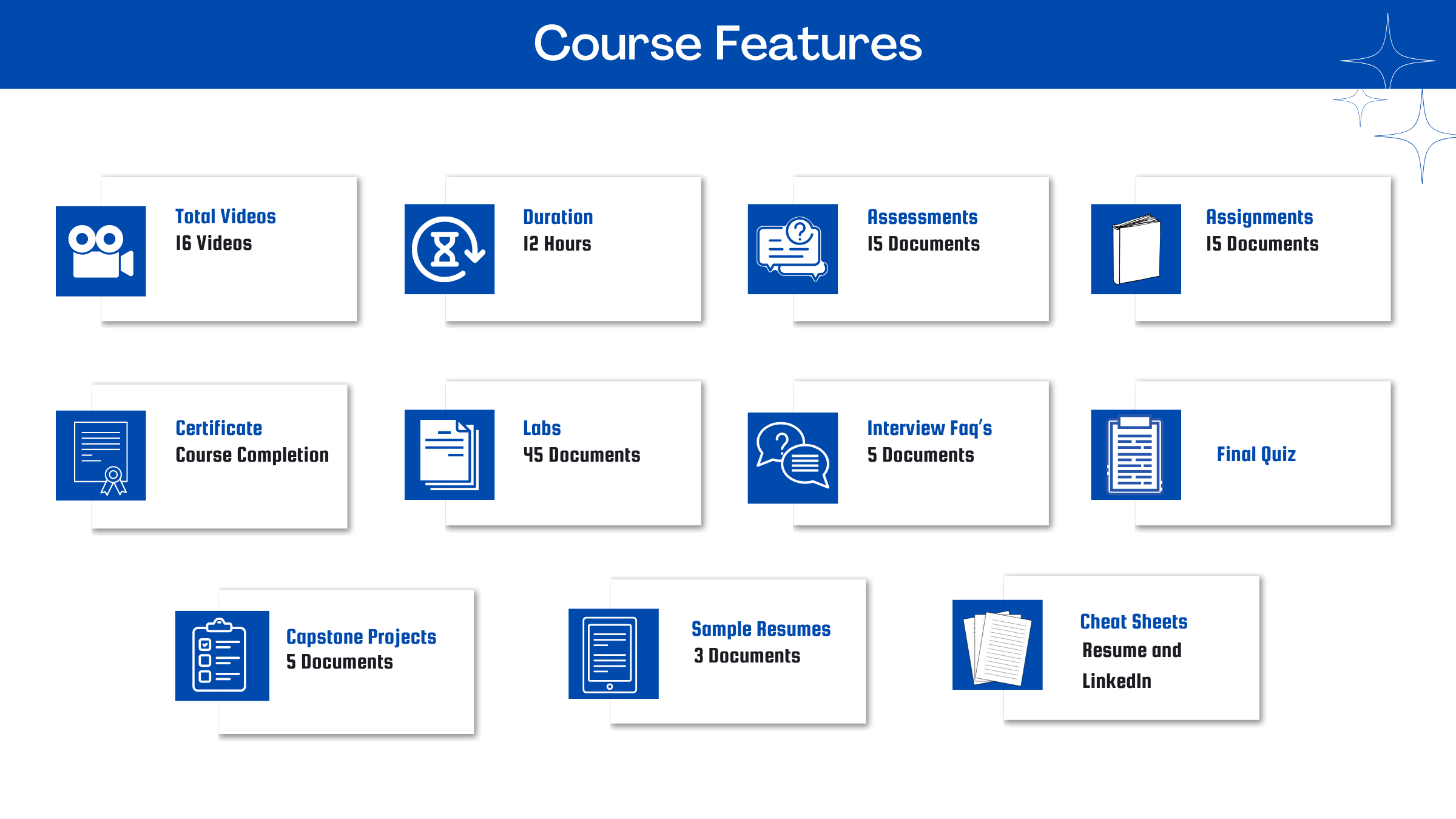
What do I get after I signup?After you signup and make the payment, you will have full access to the course which includes,
1. Session Videos (these videos are from actual live sessions from the past)
2. Assignments
3. Assessments
4. Lab documents
5. Other pdfs (configuration documents, eBooks, pdfs, interview and certification FAQs)
How do I get access to practice on the Tenant?
Reach out to your Support team and send an email to support@zarantech.com and they will send you the details and the monthly cost for the Tenant (if available)
Are the videos or materials downloadable?
No, they are not. But you have unlimited access to view them from any device and on this platform depending on your Subscription type. Everything on this platform is the intellectual property of ZaranTech
How soon after I enroll and make payment would get access to the course?Immediately
What if I have doubts, whom do I ask?
These are pre-recorded videos from the actual Live Training program. Most of the doubts were cleared in the session videos itself. But if you still have any questions, please raise a ticket, and our support team will help you https://zarantech.zohodesk.in/portal/en/newticket
What if I have an issue accessing the course?
You can Raise a ticket by clicking the link below and selecting the appropriate ticket - https://zarantech.zohodesk.in/portal/en/newticket
How will I get my course completion certificate?
Once you have completed the training and the Final Quiz/Assessment, you can avail of your Certificate of Completion from ZaranTech which you can then showcase on LinkedIn and other Social Media portals
Do you provide Instructor-led Live training for Individuals?Yes, we do. Email us at info@zarantech.com and we will send you all the details
How we deliver Live training - https://bit.ly/How-we-deliver-training
Do you provide Corporate/group training?
Yes, we do. We have trained more than 100 Workday customers with over 4000 participants in the USA, Canada, Europe, Asia, and South America. We offer corporate training for all Workday modules.
Course Catalog - https://bit.ly/workday-course-catalog
How we deliver corporate training (video) - https://bit.ly/workday-Corp-training
How do I get certified in Workday?
Workday certification is worth its weight in gold as it gives a holistic understanding of the entire application to a new professional. The criterion to attend the Workday Certification Program is that one must either be a part of Workday or should be associated with one of its partners. The certification program should be completed within a month but if you fail to get the certification in your first attempt then Workday allows you to re-do your training. This Enterprise application undergoes numerous minor updates and 2-3 major updates in a year. Whenever a major update takes place the user has to go through the training again and get the certification. This is done by Workday so that all the users remain on the same page. If you are not an employee of Workday or any of its partner companies, it is impossible to gain a Workday certification.
What if I am unhappy with the course?
We would never want you to be unhappy! If you are unsatisfied with your purchase, contact us in the first 7 days and we will give you a full refund.
What is your Refund Policy and Terms of Use?
To know more about canceling the enrollment, refund, and rescheduling policy, visit:
Refund and Rescheduling Policy – https://www.zarantech.com/Refund-policy/
Terms of Service – https://www.zarantech.com/terms-of-use/
What other Resources do you provide?
YouTube - https://www.youtube.com/@workdaylearner community
LinkedIn - https://www.linkedin.com/showcase/workday-learner-community/
Quora - https://workdaylearnercommunity.quora.com/
Workday Corporate Course Catalog - https://bit.ly/workday-course-catalog
Name some official partners of Workday.
Implementation Partners List -https://www.workday.com/en-us/partners-services/partners/services-partners.html#?q=
Integration Partners List - https://www.workday.com/en-us/partners-services/partners/software-partners.html#?q=
Past Students Testimonials.
https://bit.ly/zarantech-google-reviews