Course Introduction
Watch this video to checkout the details and the benefits you get from this training.

Start your Career in Workday Projects
You’ll learn how to create and manage project structures, assign resources, set up budgets, track spending, and generate reports. The course also covers capital projects and project costing, making it ideal for administrators and functional users-no prior Workday project experience required.
By completing this course, you will be able to learn:
- Create and configure Workday projects using templates and hierarchies
- Build project plans and apply mass updates to manage them efficiently
- Set up and manage resource planning, including forecasting availability and costs
- Define and apply project costing rules and rate sheets
- Create and manage project budgets with the appropriate configurations
- Track project spending through time entries, expense reports, POs, and supplier invoices
- Understand and configure capital projects, including work-in-progress accounts
-
Use Workday’s reporting tools to analyze project performance and build scorecards
Course Curriculum
- Lab Activity - 1. Create Project Hierarchies
- Lab Activity - 2. Create Project Templates
- Lab Activity - 3. Create Projects
- Lab Activity - 4. Create Project Plans
- Lab Activity - 5. Set Up Project Plans
- Lab Activity - 6. Configure the Project Profile
- Lab Activity - 7. Create Project Tasks
- Lab Activity - 8. Create Project Plan Templates
- Lab Activity - 9. Create Project Task Resource Templates
- Lab Activity - 10. Schedule Project Budget Mass Update
- Lab Activity - 11. Create Resource Plans
- Lab Activity - 12. Create Dynamic Resource Pools
- Lab Activity - 13. Configure Task Resources
- Lab Activity - 14. Set Up Resource Forecasts
- Lab Activity - 15. Create Projects
- Lab Activity - 16. Set Up Resource Plans
- Lab Activity - 17. Create Resource Plan Templates
- Lab Activity - 18. Configure the Project Profile
- Lab Activity - 19. Create Resource Plans
- Lab Activity - 20. Create Project Tasks
- Lab Activity - 21. Configure Task Resources
- Lab Activity - 22. Create Project Standard Cost Rate Sheets
- Lab Activity - 23. Create Project Cost Rate Rules
- Lab Activity - 24. Set Up Plan Structures for Project Budgets
- Lab Activity - 25. Set Up Hierarchy Configuration for Project Budgets
- Lab Activity - 26. Set Up Tenant Configuration for Project Budgets
- Lab Activity - 27. Create Project Budgets
- Lab Activity - 28. Create Resource Plans
- Lab Activity - 29. Create Project Budget Templates
- Lab Activity - 30. Set Up Project Tracking
- Lab Activity - 31. Set Up Security for Project Tracking
- Lab Activity - 32. Create Project Hierarchies
- Lab Activity - 33. Create Project Roles
- Lab Activity - 34. Create Project Role Categories
- Lab Activity - 35. Create Projects
- Lab Activity - 36. Set Up Resource Plans
- Lab Activity - 37. Create Resource Plans
- Lab Activity - 38. Create Project Plans
- Lab Activity - 39. Create Project Groups
- Lab Activity - 40. Configure Capital Projects
- Lab Activity - 41. Create Capital Project Work In Progress (WIP) Exclusion Rules
- Lab Activity - 42. Reconcile Work in Progress (WIP) Accounts
- Lab Activity - 43. Manage Capital Projects
- Lab Activity - 44. Create Projects
- Lab Activity - 45. Add or Edit Project Assets
- Lab Activity - 46. Create Capital Project Work In Progress (WIP) Exclusion Rules
- Lab Activity - 47. Review Capital Project Transactions
- Lab Activity - 48. Create Project Asset Assignment Rules
- Lab Activity - 49. Reconcile Work in Progress (WIP) Accounts
- Lab Activity - 50. Configure the Project Profile
- Capstone Project - 1. Internal Initiatives Portfolio (Budget vs Actual Control)
- Capstone Project - 2. Advanced Revenue (Fixed Fee + Milestone Billing)
- Capstone Project - 3. Order-to-Cash PSA (Time & Materials)
- Capstone Project - 4. Project-to-Asset (Capital Project & Capitalization)
- Capstone Project - 5. Resource Management & Staffing Optimization

Meet Your Instructor
Experience and Expertise: Over 10 years of professional experience in Workday Financial Management and Projects, with strong expertise in Workday Projects administration, project costing, billing, revenue recognition, and end-to-end finance processes such as R2R, P2P, and C2C.
Global Training Experience: Delivered practical Workday Projects and Finance training to global teams, focusing on administrator-level configuration, project lifecycle management, and real-time support scenarios.
Corporate Clientele: Worked with multiple enterprise clients across industries, supporting Workday Projects implementations, enhancements, and production support while collaborating with finance, operations, and IT stakeholders.
Certifications: Workday Financial Management Certified; Workday Projects Functional Training; Agile Foundation.
Diverse Technical Skills: Proficient in Workday Projects setup, cost rate schedules, project billing, revenue recognition, security administration, business process configuration, and Workday reporting for administrators.
Training Methodology: Uses a hands-on, scenario-driven approach focused on real administrator tasks such as project setup, troubleshooting, reporting, period close activities, and audit support.
Project Leadership: Led Workday Projects implementation and support initiatives, guided cross-functional teams, and delivered stable project accounting and reporting solutions for enterprise environments.

Got Questions?
Frequently Asked Questions
When does the course start and finish?
The course is entirely self-paced. You decide when you start and when you finish.
How long do I have access to the course?
That depends on the type of Subscription you bought - Monthly or Yearly. After enrolling, you have unlimited access to this course and materials within across any and all devices you own.
What do I get after I signup?
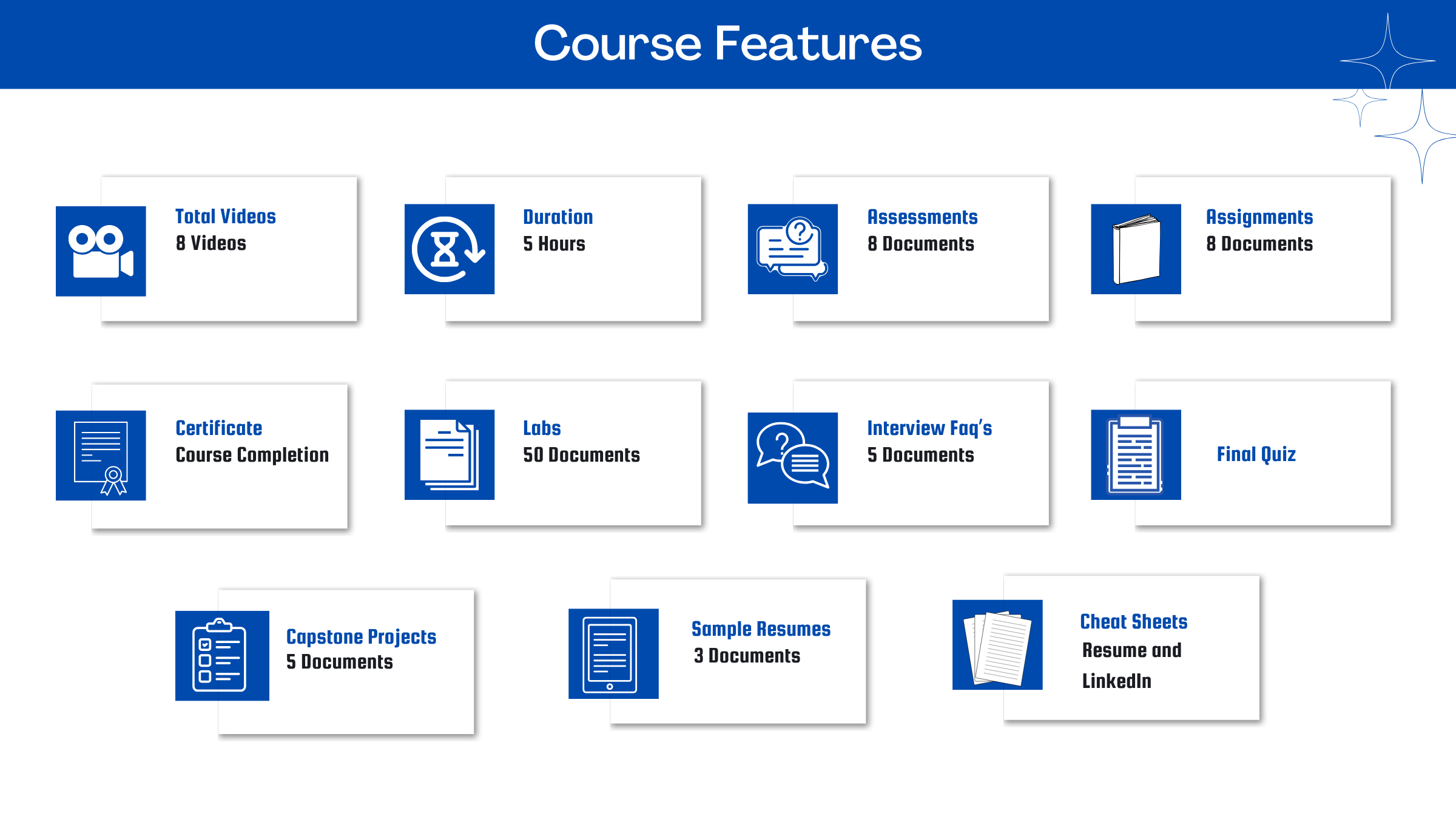
After you signup and make the payment, you will have full access to the course which includes,
1. Session Videos (these videos are from actual live sessions from the past)
2. Assignments
3. Assessments
4. Lab documents
5. Other pdfs (configuration documents, ebooks, pdfs, interview and certification faqs)
How do I get access to practice on the Server?
Reach out to your Support team and send an email to support@zarantech.com and they will send you the details and the monthly cost for the Server (if available)
Are the video or materials downloadable?
No, they are not. But you have unlimited access to view them from any device and on this platform depending on your Subscription type. Everything on this platform is the intellectual property of ZaranTech
How soon after I enroll and make payment would get access to the course?
Immediately
What if I have doubts, whom do I ask?
These are pre-recorded videos from the actual Live Training program. Most of the doubts were cleared in the session videos itself. But if you still have any questions, please raise a ticket, and our support team will help you https://zarantech.zohodesk.in/portal/en/newticket
What if I have issue accessing the course?
You can Raise a ticket by clicking the link below and select the appropriate ticket - https://zarantech.zohodesk.in/portal/en/newticket
How will I get my course completion certificate?
Once you have successfully completed the training and the Final Quiz/Assessment, then you can avail of your Certificate of Completion from ZaranTech which you can then showcase on Linkedin and other Social Media portals
Do you provide Instructor-led Live training for Individuals?
Yes, we do. Email us at info@zarantech.com and we will send you all the details
How we deliver Live training - https://bit.ly/How-we-deliver-training
Do you provide Corporate/group training?
Yes, we do. We have trained more than 100 Workday customers with over 4000 participants in USA, Canada, Europe, Asia, South America. We offer corporate training for all Workday modules.
Course Catalog - https://bit.ly/workday-course-catalog
How we deliver corporate training (video) - https://bit.ly/workday-Corp-training
How do I get certified in Workday?
Workday certification is worth its weight in gold as it gives a holistic understanding of the entire application to a new professional. The criterion to attend the Workday Certification Program is that one must either be a part of Workday or should be associated with one of its partners. The certification program should be completed within a month but if you fail to get the certification in your first attempt then Workday allows you to re-do your training. This Enterprise application undergoes numerous minor updates and 2-3 major updates in a year. Whenever a major update takes place the user has to go through the training again and get the certification. This is done by Workday so that all the users remain on the same page. If you are not an employee of Workday or any of its partner companies, it is impossible to gain a Workday certification.
What if I am unhappy with the course?
We would never want you to be unhappy! If you are unsatisfied with your purchase, contact us in the first 7 days and we will give you a full refund.
What is your Refund Policy and Terms of Use?
To know more about canceling the enrollment, refund, and rescheduling policy, visit:
Refund and Rescheduling Policy - https://www.zarantech.com/Refund-policy/
Terms of Service - https://www.zarantech.com/terms-of-use/
What other Resources do you provide?
Follow us on Youtube for FREE videos - https://www.youtube.com/@workdaylearner-community
Follow us on Linkedin for Free Materials - https://www.linkedin.com/showcase/workday-learner-community/
Follow us on Quora to Ask any Questions - https://workdaylearnercommunity.quora.com/
Checkout our Workday Corporate Course Catalog - https://bit.ly/workday-course-catalog
Name some official partners of Workday.
Implementation Partners List -https://www.workday.com/en-us/partners-services/partners/services-partners.html#?q=
Integration Partners List - https://www.workday.com/en-us/partners-services/partners/software-partners.html#?q=
Past Students Testimonials.
https://bit.ly/zarantech-google-reviews