Course Introduction
Watch this video to checkout the details and the benefits you get from this training.
Start your Career in Workday Financial Accounting Center
This course teaches how to use Workday Accounting Center along with Prism Analytics to manage accounting data from multiple systems. You will learn how to load external data, create datasets, enrich and validate accounting information, run accounting processes, and generate reports and dashboards. The course also covers batch processing, error handling, and reporting for finance operations. It is designed for learners who want to understand accounting data processing and reporting in Workday.
By completing this course, you will be able to learn:
- Understand the relationship between Prism Analytics and Workday Accounting Center
- Create and manage Prism tables, datasets, and derived datasets
- Load and validate accounting data from different source systems
- Configure accounting sources, stages, and pipelines in Accounting Center
- Perform data enrichment using mapping, joins, calculations, and validations
- Execute, monitor, and troubleshoot Accounting Center batch runs
- Maintain accounting process configurations and posting rules
- Publish datasets and create reports and discovery boards using Prism data
- Identify and resolve source-stage and batch-level processing errors
Course Curriculum
- Assessment - 1. Introducing SAP S4HANA Cloud Public Edition
- Assessment - 2. Building the Implementation Team
- Assessment - 3. Defining System Landscapes
- Assessment - 4. Setting up Systems and Authorizations
- Assessment - 5. Gathering Data in Fit-to-Standard Workshops
- Assessment - 6. Configuring Business Processes with SAP Central Business Con
- Assessment - 7. Working with the SAP Fiori Launchpad
- Assessment - 8. Customizing Authorizations
- Assessment - 9. Customizing Applications
- Assessment - 10. Setting up Integrations
- Assessment - 11. Migrating Data
- Assessment - 12. Testing Configured Business Processes
- Assessment - 1. Defining Payables Management and Its Organizational Structure
- Assessment - 2. Defining Receivables Management and its Organizational Structure
- Assessment - 3. Describing the Steps in the Record to Report Process and How Financial
- Assessment - 4. Outlining How the Universal Journal is Supporting Various Reporting Requirements
- Assessment - 5. Identifying Parts that Record All Value-Related Business Transactions and How the Enterprise Structure is Used for It
- Assessment - 6. Understanding Assets, Their Life Cycle, and Organizational Structure
- Assessment - 1. Explaining the Organizational Structure and GL Account Master Data Maintenance
- Assessment - 2. Identifying the Basic Concepts of Financial Postings and Documents
- Assessment - 3. Identifying Key Elements Required for Posting General Ledger Documents
- Assessment - 4. Performing Different Posting Procedures
- Assessment - 5. Analyzing and Reporting Accounting Data
- Assessment - 6. Describing Postings to Meet Internal and External Reporting Requirements
- Assessment - 7. Describing the Local Close Steps for General Ledger Accounting
- Assessment - 1. Managing Supplier Master Data
- Assessment - 2. Describing Key Elements of Supplier Master Data
- Assessment - 3. Explaining Supplier Master Data Maintenance Methods
- Assessment - 4. Processing Incoming Supplier Invoices
- Assessment - 5. Streamlining Supplier Invoices Processing
- Assessment - 6. Understanding the Connection between Payables Management and Materials
- Assessment - 7. Outlining Payables Key Performance Indicators (KPIs)
- Assessment - 8. Outgoing Manual Supplier Invoices
- Assessment - 9. Outgoing Automatic Supplier Payments
- Assessment - 10. Supplier Payments Monitoring Mechanisms
- Assessment - 11. Illustrating Payables Management Period-End Closing Activities
- Assessment - 1. Managing Customer Master Data
- Assessment - 2. Identifying Key Customer Master Data Fields for Accounts Receivable
- Assessment - 3. Discovering Customer Master Data Maintenance Methods
- Assessment - 4. Performing End-to-End Processes in Open Receivables Management
- Assessment - 5. Managing Customer Payments
- Assessment - 6. Executing Accounts Receivable Period Activities
- Assessment - 7. Using Accounts Receivable Closing Activities
- Assignment - 1. Introducing SAP S4HANA Cloud Public Edition
- Assignment - 2. Building the Implementation Team
- Assignment - 3. Defining System Landscapes
- Assignment - 4. Setting up Systems and Authorizations
- Assignment - 5. Gathering Data in Fit-to-Standard Workshops
- Assignment - 6. Configuring Business Processes with SAP Central Business Configuration
- Assignment - 7. Working with the SAP Fiori Launchpad
- Assignment - 8. Customizing Authorizations
- Assignment - 9. Customizing Applications
- Assignment - 10. Setting up Integrations
- Assignment - 11. Migrating Data
- Assignment - 12. Testing Configured Business Processes
- Assignment - 1. Defining Payables Management and Its Organizational Structure
- Assignment - 2. Defining Receivables Management and its Organizational Structure
- Assignment - 3. Describing the Steps in the Record to Report Process and How Financial
- Assignment - 4. Outlining How the Universal Journal is Supporting Various Reporting Requirements
- Assignment - 5. Identifying Parts that Record All Value-Related Business Transactions and How the Enterprise Structure is Used for It
- Assignment - 6. Understanding Assets, Their Life Cycle, and Organizational Structure
- Assignment - 1. Explaining the Organizational Structure and G_L Account Master Data Maintenance
- Assignment - 2. Identifying the Basic Concepts of Financial Postings and Documents
- Assignment - 3. Identifying Key Elements Required for Posting General Ledger Documents
- Assignment - 4. Performing Different Posting Procedures
- Assignment - 5. Analyzing and Reporting Accounting Data
- Assignment - 6. Describing Postings to Meet Internal and External Reporting Requirements
- Assignment - 7. Describing the Local Close Steps for General Ledger Accounting
- Assignment - 1. Managing Supplier Master Data
- Assignment - 2. Describing Key Elements of Supplier Master Data
- Assignment - 3. Explaining Supplier Master Data Maintenance Methods
- Assignment - 4. Processing Incoming Supplier Invoices
- Assignment - 5. Streamlining Supplier Invoices Processing
- Assignment - 6. Understanding the Connection between Payables Management and Materials Management
- Assignment - 7. Outlining Payables Key Performance Indicators (KPIs)
- Assignment - 8. Outgoing Manual Supplier Invoices
- Assignment - 9. Outgoing Automatic Supplier Payments
- Assignment - 10. Supplier Payments Monitoring Mechanisms
- Assignment - 11. Illustrating Payables Management Period-End Closing Activities
- Assignment - 1. Managing Customer Master Data
- Assignment - 2. Identifying Key Customer Master Data Fields for Accounts Receivable
- Assignment - 3. Discovering Customer Master Data Maintenance Methods
- Assignment - 4. Performing End-to-End Processes in Open Receivables Management
- Assignment - 5. Managing Customer Payments
- Assignment - 6. Executing Accounts Receivable Period Activities
- Assignment - 7. Using Accounts Receivable Closing Activities
- Lab Activity - 1. Get Started with SAP Central Business Configuration
- Lab Activity - 2. Manage User Setup and Access
- Lab Activity - 3. Request SAP Central Business Configuration via SAP for Me (3SL)
- Lab Activity - 4. Set Up Evaluation Workspace
- Lab Activity - 5. Add New Scope and Organizational Units
- Lab Activity - 6. Assign Deployment Targets
- Lab Activity - 7. Configure Business Processes (3SL)
- Lab Activity - 8. Define Scope
- Lab Activity - 9. Deploy Scope and Organizational Structure
- Lab Activity - 10. Set Up Organizational Structure
- Lab Activity - 11. Specify Primary Finance Settings
- Lab Activity - 12. Getting Help
- Lab Activity - 13. The SAP Fiori Launchpad
- Lab Activity - 14. Adding a Custom Field to the UI of a Document
- Lab Activity - 15. Exploring Extensibility Cockpit
- Lab Activity - 16. Exploring UI Flexibility
- Lab Activity - 17. Introducing the SAP S4HANA Migration Cockpit
- Lab Activity - 18. Adapting Best Practice Automates
- Lab Activity - 19. Creating a Test Data Container and its Variants
- Lab Activity - 20. Executing a Test Plan containing API Test Process Steps
- Lab Activity - 21. Features of Analyze Automated Test Result
- Lab Activity - 22. Features of Manage Your Test Processes
- Lab Activity - 23. Maintaining Communication User Role (API)
- Lab Activity - 24. Triggering Post-Upgrade Tests by Customers
- Lab Activity - 1. Create a Supplier Master Record.docx
- Lab Activity - 2. Create Supplier Invoice
- Lab Activity - 3. Analyze Open Items in Payables Management
- Lab Activity - 4. Overdue Payables
- Lab Activity - 5. Aging Analysis
- Lab Activity - 6. Create Customer Master Record
- Lab Activity - 7. Create Customer Invoice
- Lab Activity - 8. Analyze Open Items in Receivables Management
- Lab Activity - 9. Overdue Receivables
- Lab Activity - 10. Create an Asset Master Record
- Lab Activity - 11. Post an Integrated Asset Acquisition and Analyze the Asset
- Lab Activity - 12. Analyze the Asset in the Asset Balance Report
- Lab Activity - 13. Analyze the Asset in the Balance Sheet
- Lab Activity - 14. Analyze the Planned Depreciation
- Lab Activity - 15. Analyze the Asset in the Asset History Sheet
- Lab Activity - 1. Manage Posting Periods
- Lab Activity - 2. Post General Journal Entry into a Special Period
- Lab Activity - 3. Browse from Balance Sheet to Document
- Lab Activity - 4. Retrieve a Posted FI Document in Different Ways
- Lab Activity - 5. Post General Ledger Entries
- Lab Activity - 6. Upload a GL Document
- Lab Activity - 7. Enter and Hold a Journal Entry
- Lab Activity - 8. Modify a Journal Entry in General Ledger Accounting
- Lab Activity - 9. Perform the Manual Clearing of an Open Item
- Lab Activity - 10. Reverse a Journal Entry and check the Account Balances
- Lab Activity - 11. Generate Financial Statements Reports
- Lab Activity - 12. Displaying Line Items in General Ledger
- Lab Activity - 13. Verifying General Journal Entries for Ledger Group
- Lab Activity - 14. Create a Journal Entry with Auto-Reverse
- Lab Activity - 15. Create a Recurring Charge
- Lab Activity - 16. Execute Automatic Clearing
- Lab Activity - 17. Manage and Use Financial Statement Versions
- Lab Activity - 18. Post to a Ledger Group
- Lab Activity - 19. Prepare Your User and SAP Fiori Launchpad
- Lab Activity - 1. Create a Supplier Fact Sheet
- Lab Activity - 2. Create a Supplier List
- Lab Activity - 3. Create a Supplier
- Lab Activity - 4. Prepare Your User and SAP Fiori Launchpad
- Lab Activity - 5. Configure Supplier Company Code Settings
- Lab Activity - 6. Manage Supplier Bank Data
- Lab Activity - 7. Assign Supplier to additional Company Code and Track Changes
- Lab Activity - 8. Clear Supplier Account
- Lab Activity - 9. Create a Supplier Invoice
- Lab Activity - 10. Create Incoming Invoice
- Lab Activity - 11. Create Incoming Supplier Credit Memo
- Lab Activity - 12. Create Supplier Credit Memo (without reference)
- Lab Activity - 13. Hold Supplier Invoice
- Lab Activity - 14. Manage Supplier Line Items
- Lab Activity - 15. Changes in Payables Postings – Single and Mass
- Lab Activity - 16. Create Recurring Entries
- Lab Activity - 17. Create a Supplier Invoice with Purchase Order
- Lab Activity - 18. Create Purchase Order and Post Goods Receipt
- Lab Activity - 19. Accounts Payable Overview
- Lab Activity - 20. Prepare Your User and Fiori Launchpad
- Lab Activity - 21. Create Documents for Automatic Payments
- Lab Activity - 22. Run the Payment Proposal
- Lab Activity - 23. Execute the Payment Run
- Lab Activity - 24. Create an Invoice and a Single Payment
- Lab Activity - 25. Prepare Your User and Fiori Launchpad
- Lab Activity - 26. Reconcile the GRIR Clearing Account
- Lab Activity - 27. Create a Supplier Balance Confirmation
- Lab Activity - 28. Run a Foreign Currency Valuation
- Lab Activity - 29. Accounts Payable by Remaining Term Regrouping
- Lab Activity - 30. Reclassify Accounts Payable with Debit Balance
- Lab Activity - 31. Regroup Payables due to Reconciliation Account Change
- Lab Activity - 1. Prepare Your User and Fiori Launchpad
- Lab Activity - 2. Create Customer Master Data
- Lab Activity - 3. Create a Customer List
- Lab Activity - 4. Display the Customer Object Page
- Lab Activity - 5. Update Business Partner Bank Account Information
- Lab Activity - 6. Update Company Code Information for a Customer
- Lab Activity - 7. Extend Customer to an Additional Company Code
- Lab Activity - 8. Copy a Business Partner
- Lab Activity - 9. Copy a Customer Master Record
- Lab Activity - 10. Create a Duplicate Business Partner
- Lab Activity - 11. Add an Additional Role to a Business Partner
- Lab Activity - 12. Display Changes to Customer Master Records
- Lab Activity - 13. Prepare your User and Fiori Launchpad
- Lab Activity - 14. Enter Customer Invoices and Credit Memos
- Lab Activity - 15. Maintain Editing Options
- Lab Activity - 16. Manage Customer Line Items
- Lab Activity - 17. Manage Document Changes and Reversals
- Lab Activity - 18. Execute Manual Clearing
- Lab Activity - 19. Reset Cleared Items
- Lab Activity - 20. Execute Automatic Clearing
- Lab Activity - 21. Single Document Changes
- Lab Activity - 22. Sales Order Integration to Receivables
- Lab Activity - 23. Outline Receivables Key Performance Indicators fo
- Lab Activity - 24. Overdue Receivables
- Lab Activity - 25. Prepare your User and Fiori Launchpad
- Lab Activity - 26. Process a Manual Incoming Payment with a Difference
- Lab Activity - 27. Create an Outgoing Customer Invoice
- Lab Activity - 28. Process Incoming Payment Files
- Lab Activity - 29. Reprocess Bank Statements
- Lab Activity - 30. Prepare Your User and SAP Fiori Launchpad
- Lab Activity - 31. Create a Customer Master Record
- Lab Activity - 32. Create a Customer Account Statement
- Lab Activity - 33. Clear Customer Open Items Manually
- Lab Activity - 34. Define the Accounting Clerk
- Lab Activity - 35. Modify a Customer Master Record
- Lab Activity - 36. Modify Customer Invoices for the Dunning Program
- Lab Activity - 37. Schedule a Dunning Run
- Lab Activity - 38. Edit a Dunning Proposal List
- Lab Activity - 39. Print a Dunning Notice
- Lab Activity - 40. Create a Customer Balance Confirmation
- Lab Activity - 41. Run a Foreign Currency Valuation
- Lab Activity - 42. Enter an Individual Value Adjustment
- Lab Activity - 43. Execute a Valuation Run
- Lab Activity - 44. Regroup Accounts Receivable by Remaining Term
- Lab Activity - 45. Reclassify Accounts Receivable with Credit Balance
- Lab Activity - 1. Prepare Your User and Fiori Launchpad
- Lab Activity - 2. Create the Main Asset Master Data
- Lab Activity - 3. Create Five Computers
- Lab Activity - 4. Create an Asset Master Record as Sub-Number
- Lab Activity - 5. Change Asset Master Data
- Lab Activity - 6. Post an Integrated Asset Acquisition and Analyze the Value
- Lab Activity - 7. Post an Acquisition and Analyze
- Lab Activity - 8. Post Asset Balances Against Expense and Analyze
- Lab Activity - 9. Post Credit Memo and Analyze
- Lab Activity - 10. Create Asset Master Data with Quantity, Post, and Analyze
- Lab Activity - 11. Post Retirement by Scrapping
- Lab Activity - 12. Post Retirement With Revenue
- Lab Activity - 13. Analyze the Assets in the Asset Balances Report
- Lab Activity - 14. Analyze the Asset in the Asset Transaction
- Lab Activity - 15. Post Reversal of the Retirement by Scrapping and Analyze
- Lab Activity - 16. Transfer Within Company Code and Analyze
- Lab Activity - 17. Make a Time-Dependent Change in Balance-Sheet-Relevant Fields
- Lab Activity - 18. Create and Release an Investment Project with WBS Element
- Lab Activity - 19. Settle the WBS Element Welding Cell to the Assigned Asset Under Construction
- Lab Activity - 20. Maintain the Settlement Rule
- Lab Activity - 21. Perform Full Settlement and Analyze the Result
- Lab Activity - 22. Change the Useful Life for an Activated Asset
- Lab Activity - 23. Execute a Depreciation Test Run and Analyze the Log
- Capstone Project - 1. Enterprise Data Lake to Workday FAC – Unified Subledger
- Capstone Project - 2. Insurance Claims Subledger on Workday FAC
- Capstone Project - 3. Loan Leasing Portfolio Accounting Hub
- Capstone Project - 4. Retail POS to Workday FAC – High‑Volume Subledger
- Capstone Project - 5. Telecom Usage & Billing to Revenue Accounting in FAC

Meet Your Instructor
Experience and Expertise: Over 12 years of experience in SAP Finance and Accounting solutions, with strong expertise in SAP FICO, S/4HANA Finance, Treasury, Cash Management, and financial transformation programs.
Global Training Experience: Delivered practical SAP finance training and consulting sessions for global teams, covering financial accounting, reporting, compliance, and enterprise finance processes.
Corporate Clientele: Worked with organizations across multiple industries, supporting SAP implementations, upgrades, finance transformation initiatives, and post go-live support activities.
Certifications: Certified SAP Financial Accounting Associate - TS4FI202.
Diverse Technical Skills: Proficient in SAP FICO, SAP S/4HANA Finance, Universal Journal, Treasury and Cash Management, Product Costing, Profitability Analysis, SAP Fiori, SAP BW, SAP Workflow, LSMW, ALE/IDocs, and SAP BusinessObjects.
Training Methodology: Uses a hands-on, scenario-based approach focused on real-world finance processes, reporting, system configuration, and accounting compliance use cases.
Project Leadership: Led SAP finance implementation and transformation projects, including system upgrades, testing, integrations, financial reporting optimization, and cross-functional coordination activities.

Got Questions?
Frequently Asked Questions
When does the course start and finish?
The course is entirely self-paced. You decide when you start and when you finish.
How long do I have access to the course?
That depends on the type of Subscription you bought - Monthly or Yearly. After enrolling, you have unlimited access to this course and materials within across any and all devices you own.
What do I get after I signup?
After you signup and make the payment, you will have full access to the course which includes,
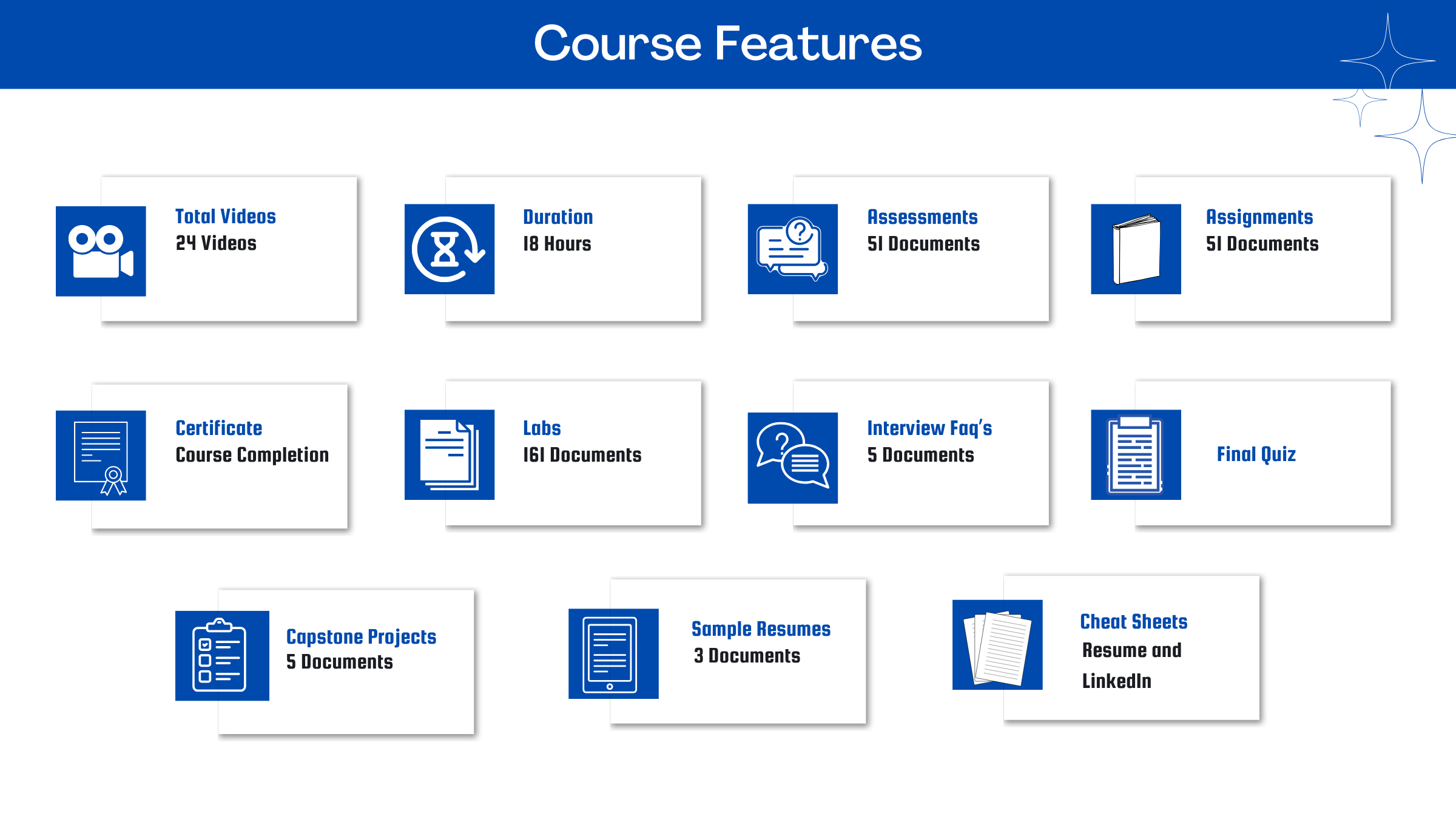
1. Session Videos (these videos are from actual live sessions from the past)
2. Assignments
3. Assessments
4. Lab documents
5. Other pdfs (configuration documents, ebooks, pdfs, interview and certification faqs)
How do I get access to practice on the Server?
Reach out to your Support team and send an email to support@zarantech.com and they will send you the details and the monthly cost for the Server (if available)
Are the video or materials downloadable?
No, they are not. But you have unlimited access to view them from any device and on this platform depending on your Subscription type. Everything on this platform is the intellectual property of ZaranTech
How soon after I enroll and make payment would get access to the course?
Immediately
What if I have doubts, whom do I ask?
These are pre-recorded videos from the actual Live Training program. Most of the doubts were cleared in the session videos itself. But if you still have any questions, please raise a ticket, and our support team will help you https://zarantech.freshdesk.com/support/tickets/new
What if I have issue accessing the course?
You can Raise a ticket by clicking the link below and select the appropriate ticket - https://zarantech.freshdesk.com/support/tickets/new
How will I get my course completion certificate?
Once you have successfully completed the training and the Final Quiz/Assessment, then you can avail of your Certificate of Completion from ZaranTech which you can then showcase on Linkedin and other Social Media portals
Do you provide Instructor-led Live training for Individuals?
Yes, we do. Email us at info@zarantech.com and we will send you all the details
How we deliver Live training - https://bit.ly/How-we-deliver-training
Do you provide Corporate/group training?
Yes, we do. We have trained more than 100 Workday customers with over 4000 participants in USA, Canada, Europe, Asia, South America. We offer corporate training for all Workday modules.
Course Catalog - https://bit.ly/workday-course-catalog
How we deliver corporate training (video) - https://bit.ly/workday-Corp-training
How do I get certified in Workday?
Workday certification is worth its weight in gold as it gives a holistic understanding of the entire application to a new professional. The criterion to attend the Workday Certification Program is that one must either be a part of Workday or should be associated with one of its partners. The certification program should be completed within a month but if you fail to get the certification in your first attempt then Workday allows you to re-do your training. This Enterprise application undergoes numerous minor updates and 2-3 major updates in a year. Whenever a major update takes place the user has to go through the training again and get the certification. This is done by Workday so that all the users remain on the same page. If you are not an employee of Workday or any of its partner companies, it is impossible to gain a Workday certification.
What if I am unhappy with the course?
We would never want you to be unhappy! If you are unsatisfied with your purchase, contact us in the first 7 days and we will give you a full refund.
What is your Refund Policy and Terms of Use?
To know more about canceling the enrollment, refund, and rescheduling policy, visit:
Refund and Rescheduling Policy - https://www.zarantech.com/Refund-policy/
Terms of Service - https://www.zarantech.com/terms-of-use/
What other Resources do you provide?
Follow us on Youtube for FREE videos - https://www.youtube.com/@workdaylearner-community
Follow us on Linkedin for Free Materials - https://www.linkedin.com/showcase/workday-learner-community/
Follow us on Quora to Ask any Questions - https://workdaylearnercommunity.quora.com/
Checkout our Workday Corporate Course Catalog - https://bit.ly/workday-course-catalog
Name some official partners of Workday.
Implementation Partners List -https://www.workday.com/en-us/partners-services/partners/services-partners.html#?q=